Prime
PrimeMagene Outdoor/Indoor Speed/Cadence Sensor for Cycling, Wireless Bluetooth/Ant+ Bike Computer RPM Sensor for Road Bike or Spinning Bike and Trainers Compatible with Onelap, Wahoo Fitness, Zwift
Zesta →Price
$16.99
Rating
Description
is a combined word of “magnetic” and “gene”, which means that is a technology company possessing magnetic gene. Founded in December 2015, has always been committed to the development of intelligent, interesting and information-based cycling sports. Focusing on user needs and oriented by the development trend of cycling, Magene applies cutting-edge R&D technologies, innovative scientific and technological products and smart sports equipment to both outdoor and indoor cycling scenes, so as to create excellent and pleased cycling experience for users in a scientific way Our vision:To be the leading brand for smart-cycling ecosystem Our mission:Enable cyclists to have a safe, easy-to-use, enjoyable biking experience To ensure a smooth experience with your Magene S3+ sensor, please carefully review the following key points. These tips address the most common reasons why the device may fail to connect. Review Instructions First: If you're experiencing connection issues, start by watching the operation video in the main listing image and reading the detailed user manual included in the product packaging. Remove the Battery Insulation Film: Before first use, ensure the insulation film on the battery has been completely removed. Secure the Battery Cover Properly: Rotate the battery cover clockwise until the white dot aligns with the lock mark. This ensures proper contact. Check for LED Indicator: Once powered, the sensor should flash a green or red light. If no light appears, the sensor is not powered on and cannot be connected. Speed Mode: Spin the wheel to activate the sensor and allow it to be detected. Cadence Mode: Rotate the crank arm to trigger the sensor. If the sensor remains idle, it will stay in sleep mode and cannot be connected. Do NOT connect via your phone’s Bluetooth settings. Make sure your phone’s Bluetooth is turned on. Open a compatible cycling app (e.g., Magene, Wahoo, Zwift). Add the S3+ sensor within the app interface. Remove the battery, wait 5 seconds, then reinstall (tighten cover to LOCK). Green flashing: Speed mode (mount on spokes). Red flashing: Cadence mode (mount on ). If indicator does not match intended use, repeat battery removal/reinstall. Speed mode: Secure to spokes, sensor near hub, sensing area <5mm from rim/metal. Cadence mode: Attach to exterior, ensure clear rotation path. After mounting, manually spin wheel/crank and check for data in app. Ensure plastic battery tab is removed. Sensor enters sleep after 1 minute inactivity; spin wheel/crank to wake. Replace with fresh CR2032 battery if unused for extended periods. Open app (Zwift, Garmin Connect, Magene Utility, etc.) and search for sensor (BLE & ANT+ supported). If not detected: Disable nearby Bluetooth devices → wake sensor → rescan. Test first with official app. If unresolved, contact support with photos/video of LED and mounting setup.
Key Features
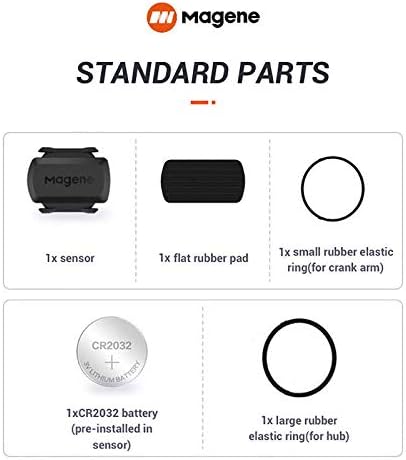
- •[Battery] Remove the insulating sheet of the pre-installed battery before usage; re-install the battery to switch between the speed and cadence mode.
- •[Mode] 1 sensor can ONLY select one mode (Speed or Cadence) at the one time.So you need 2 sensors to test both speed and cadence.(1 for speed,1 for cadence)
- •[Device] When using the Bluetooth protocol 1 sensor can ONLY connect to 1 APP or device concurrently; When using ANT+ protocol it can be connected to multiple devices at the same time.
- •[Connection] When using a smart phone APP, you need to search for the sensor in the APP, searching through the phone system’s Bluetooth setting is invalid.
- •[Hibernation] S3+ sensor will automatically enter the sleep state for 1 minute to save power after the sensor is stationary, the sensor will ONLY start sending broadcasts after it is properly woken-up.
Product Details
Product ID
B08252X8VS
ASIN
B08252X8VS
Category
Sports & Outdoors > Sports & Outdoor Recreation Accessories > Electronics & Gadgets > Cycling Computers
Reviews
7,169
Prime Eligible
Yes
Last Scraped
2/18/2026
Technical Details
PDP Compliance Check
All Assets (14)